How to Find Jobs That Fit You with AI: One Prompt for 20+ Scored Job Matches
Upload your resume and let AI search for open roles at 20+ companies, score each job from 0 to 100, and sort them into Top, High, Medium, and Stretch tables. Includes the full prompt, follow-ups when results fall short, and why the same prompt gives different results.

This article gives you a ready-to-copy job search prompt: upload your resume, and AI searches the web for open roles at 20+ companies, scores each job from 0 to 100, and sorts them into four tables: Top Match, High Probability, Medium Probability, and Stretch. It works in ChatGPT, Claude, and Gemini, for jobs in Taiwan or anywhere else.
TL;DR
- Turn on web search. Without it, the jobs and links are almost always made up.
- Fill in your language skills yourself. Don't let AI guess them from your resume.
- If you get fewer than 20 jobs or the format breaks, use the follow-up prompts below.
- Getting different results from the same prompt is normal. Reasons and fixes are below.
- Always open jobs marked ⚠️ yourself and confirm they're still open before applying.
What does this prompt do?
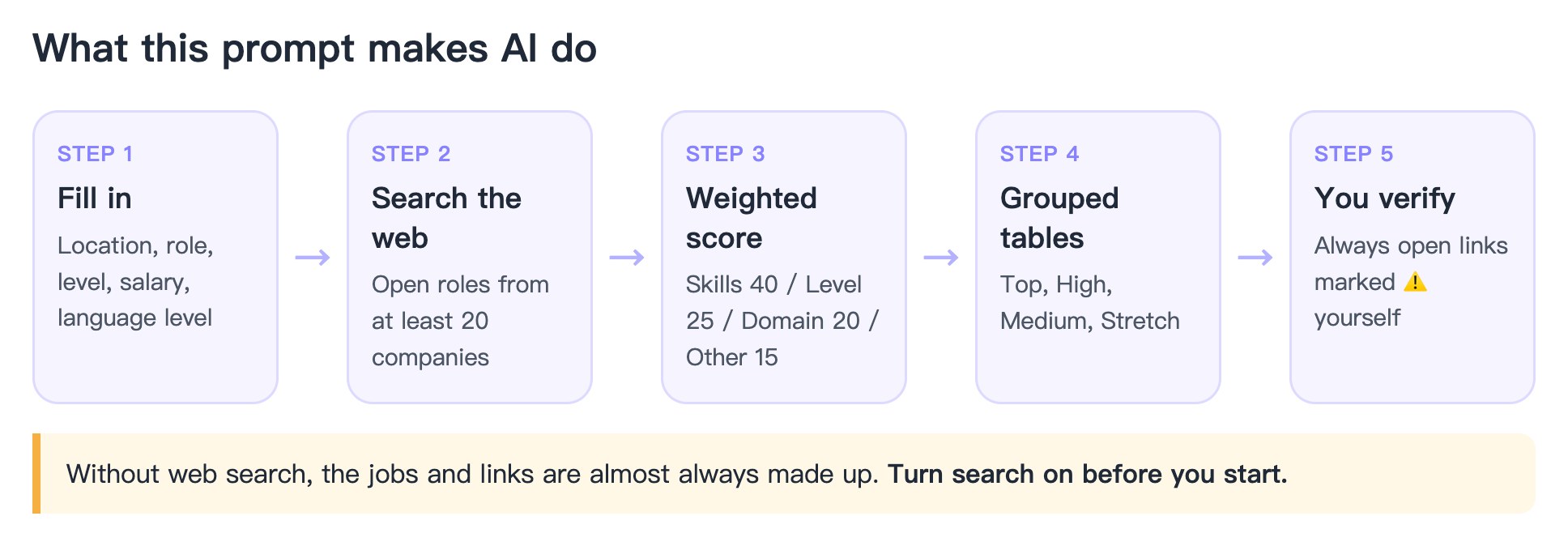
There are plenty of "make AI your recruiter" prompts going around. When I tried them, I ran into two problems: AI made up jobs to hit the requested number, and the output format changed every time, so results were hard to compare. This version focuses on three things: enough jobs, a fixed format, and honest labels when something can't be verified.
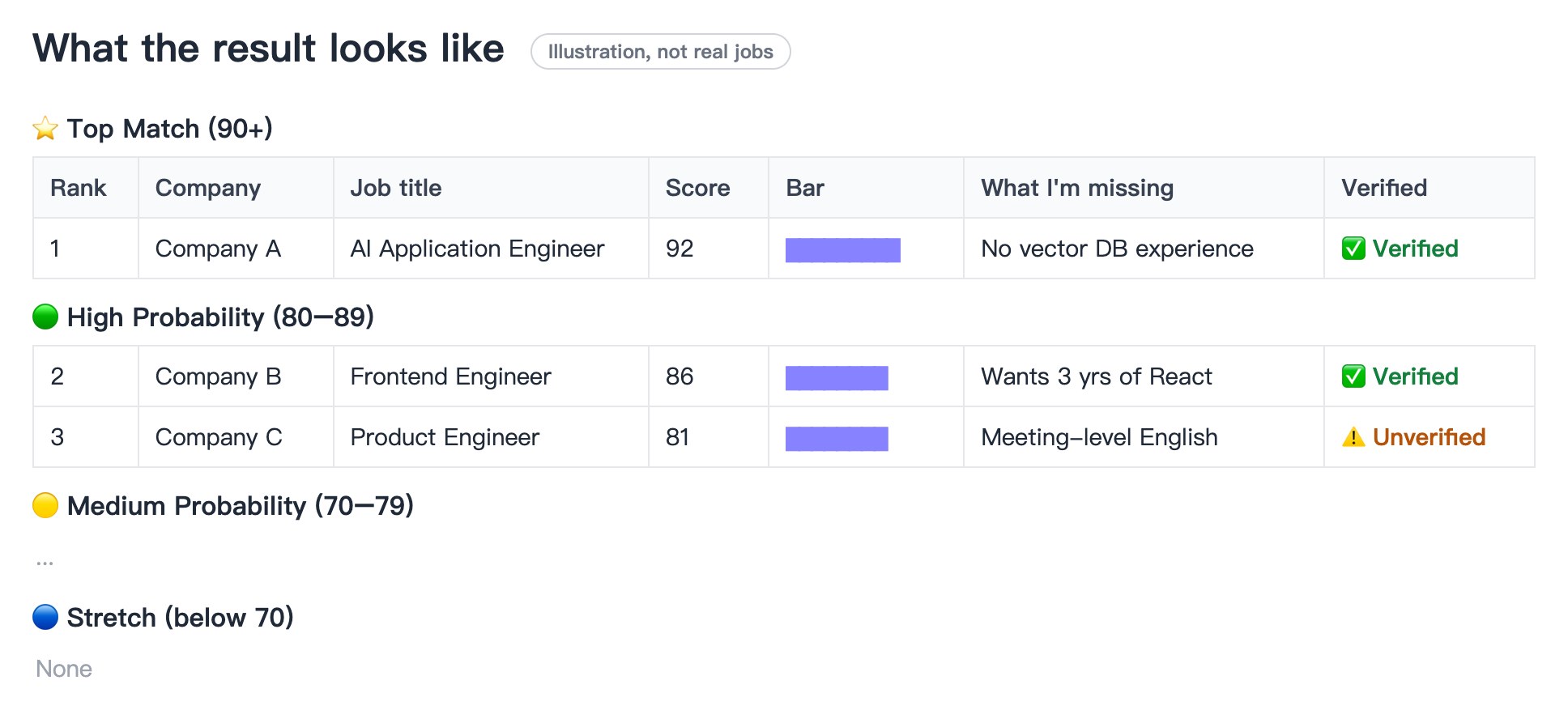
The result looks like this: one table per group, with a score, a score bar, what you're missing, and whether the link was verified.
Before you start: turn on web search
This prompt asks AI to find jobs that are open right now. Without search, AI can only answer from memory: the companies may have stopped hiring long ago, and the links may be made up.
- ChatGPT: make sure search is turned on for the chat.
- Claude: make sure web search is turned on.
- Gemini: regular chats can use Google Search. For a more thorough search, use Deep Research.
All three have a "deep research" style feature. It takes longer, but usually finds more jobs with more complete details.
The job search prompt
Fill in the "My preferences" section before pasting. Set the location to "Taiwan" to search Taiwan only, or "anywhere" to include overseas and remote jobs.
I will upload my resume. Act as a senior recruiter and job search strategist, and follow these rules.

[My preferences] (If blank, infer from my resume and state your assumptions at the start. Never infer language skills.)
- Target location: (e.g., Taiwan / Taipei, or "anywhere, including global remote")
- Nationality & work authorization: (only needed for overseas jobs)
- Target role / direction:
- Career stage: fresh graduate / 1–3 yrs / 3–5 yrs / 5+ yrs / career switcher
- Expected salary:
- Work type: full-time / contract / remote / hybrid
- Language skills: (e.g., Mandarin native; English: business reading, basic speaking)
- Industries or companies to exclude:

[Step 1: Resume analysis]
In 5 lines or fewer: my core skills, strongest selling points, clear gaps, and the 3–5 best-fit job titles (with synonyms).

[Step 2: Job search (quantity rule is the most important)]
- Use web search to find real, currently open positions.
- Find at least 20 jobs from 20 different companies BEFORE writing your answer. If you have fewer than 20, automatically try new keywords, job titles, and job boards. Do not stop to ask me.
- Taiwan sources: 104, 1111, Cake, Yourator, LinkedIn, company career pages. Overseas: LinkedIn, Indeed, Glassdoor, Wellfound, local job boards, company career pages.
- Cover startups, scale-ups, MNCs, consulting firms, and large companies, in both tech and non-tech sectors.
- Prioritize jobs likely to score 70+, but score honestly. Never inflate scores to fill a group.

[Step 3: Scoring]
Score each job 0–100: skills match 40%, experience level 25%, industry/domain relevance 20%, other factors (salary, location, language, visa) 15%.
- Use only the language skills I listed. If a job requires a higher level, put it under "What I'm missing" and lower the score.

[Step 4: Output format (fixed, same every time)]
Output these four groups in order, one table each, sorted by score. If a group is empty, keep the heading and write "None":

⭐ Top Match (90+)
🟢 High Probability (80–89)
🟡 Medium Probability (70–79)
🔵 Stretch (below 70 but worth applying)

Table columns:
Rank | Company | Job title | Location / remote | Salary (only if listed) | Score | Score bar (█ per 10 points) | Why it fits me (one line) | What I'm missing (one line) | Application link | Verification

Verification must be one of:
✅ Verified (opened the posting; link goes directly to the job)
⚠️ Unverified (found in search, but link couldn't be opened directly or date unknown)
Never invent companies, jobs, or links.

[Step 5: Summary]
1. One-line count: N jobs total. Top X, High X, Medium X, Stretch X, Verified X, Unverified X.
2. A bar chart of all job scores (render a chart if you can; otherwise use text █ bars).
3. My top 5 jobs to apply to first, with 1–2 resume tweaks for each.
4. The 3 most important things to strengthen on my resume.
How to fill in each field
- Target role: leave it blank if you're unsure. AI will infer it from your resume and state its assumption at the start, so you can correct it.
- Career stage: if you're changing careers, choose "career switcher" so AI counts your transferable skills instead of only your years in the new field.
- Always fill in your language skills yourself. The first time I used a prompt like this, I left it out, and AI described me as fluent in English and Japanese. My guess is it saw "bilingual website" and "Japanese clients" on my resume, but neither means I'm fluent. That kind of mistake fills your list with jobs requiring fluent foreign languages and inflates the scores.
- Expected salary: jobs paying clearly below it will be scored lower.
Fewer than 20 jobs, or the format broke?
No need to start over. Paste one of these into the same chat.
Not enough jobs:
Keep searching until you have at least 20 jobs. Use the same groups and table format, and don't repeat companies already listed.
The format broke or groups are missing:
Reorganize all the jobs above into four tables: Top Match (90+), High Probability (80–89), Medium Probability (70–79), and Stretch (below 70). If a group is empty, still show it and write "None". Keep the original columns.
To dig into one job:
For job #__, open the posting and tell me:
1. The 3 things this job values most
2. Which lines on my resume to change so it fits this job better (never invent experience I don't have)
3. The 5 questions I'm most likely to be asked in the interview
Why does the same prompt give different results each time?
It happened to me too: the first run gave me more than 20 companies with complete grouped tables. In a new chat, the same prompt returned only a few jobs and no tables. There are four common reasons:
- Web search was off, or the model was different. A new chat may default to another model, or search may not be on. This is the most common cause.
- AI answers vary by nature. The jobs found and the scores given will differ from run to run. If none of the jobs found this time score above 80, the high-score groups will be empty. The prompt above requires empty groups to still be shown, which keeps the format consistent.
- The prompt was different. A version with a "don't pad the list" rule stops when it can't find enough verified jobs. A version without that rule always reaches 20, but some companies may be made up.
- The new chat doesn't know your background. Your first chat may have used AI's memory feature, or you may have described your experience earlier. A new chat only sees the resume you upload. If the file wasn't read properly, scores will come out low.
After you get the list
- Open every link, especially those marked ⚠️. Jobs can close within days. A job that was open when AI searched may be gone by the time you apply.
- Start with Top Match and High Probability. Save Stretch roles for practice or when you have time.
- Tailor your resume for each one. Paste the job post and your resume into AI together. Ask it to list what the job values most and which keywords your resume is missing, and tell it never to add experience you don't have.
FAQ
Can I use the free versions of ChatGPT, Claude, or Gemini?
Yes, as long as the free version you use has web search. Free plans have lower usage limits, so you may need two or three follow-ups to reach 20 jobs.
How accurate are the scores?
The scores are AI's estimates based on the weights in the prompt. Use them for ranking only. They aren't your real chance of getting hired. The most useful column is "What I'm missing", which tells you what to strengthen on your resume.
Can I search for remote jobs only?
Yes. Set the location to "anywhere, fully remote only" and the work type to "remote". If you don't have work authorization in a country, say so under "Nationality & work authorization" so AI excludes jobs restricted to local residents.
For more free prompts, visit the Toolbox.