Opened a Handmade Dessert Shop but Can't Build a Brand Website? Don't Worry, This Prompt Makes a Beautiful One in Three Minutes
Ask an AI to build a dessert shop website and eight times out of ten you get the same shop: pink background, rounded cards, your products redrawn as illustrations, buttons that do nothing. The tool isn't the problem. The prompt never said what must not change and what must actually work. This post gives you a condensed prompt that locks the four places that break most often, plus the three most common fixes. The full nine-section version is free in the toolbox.
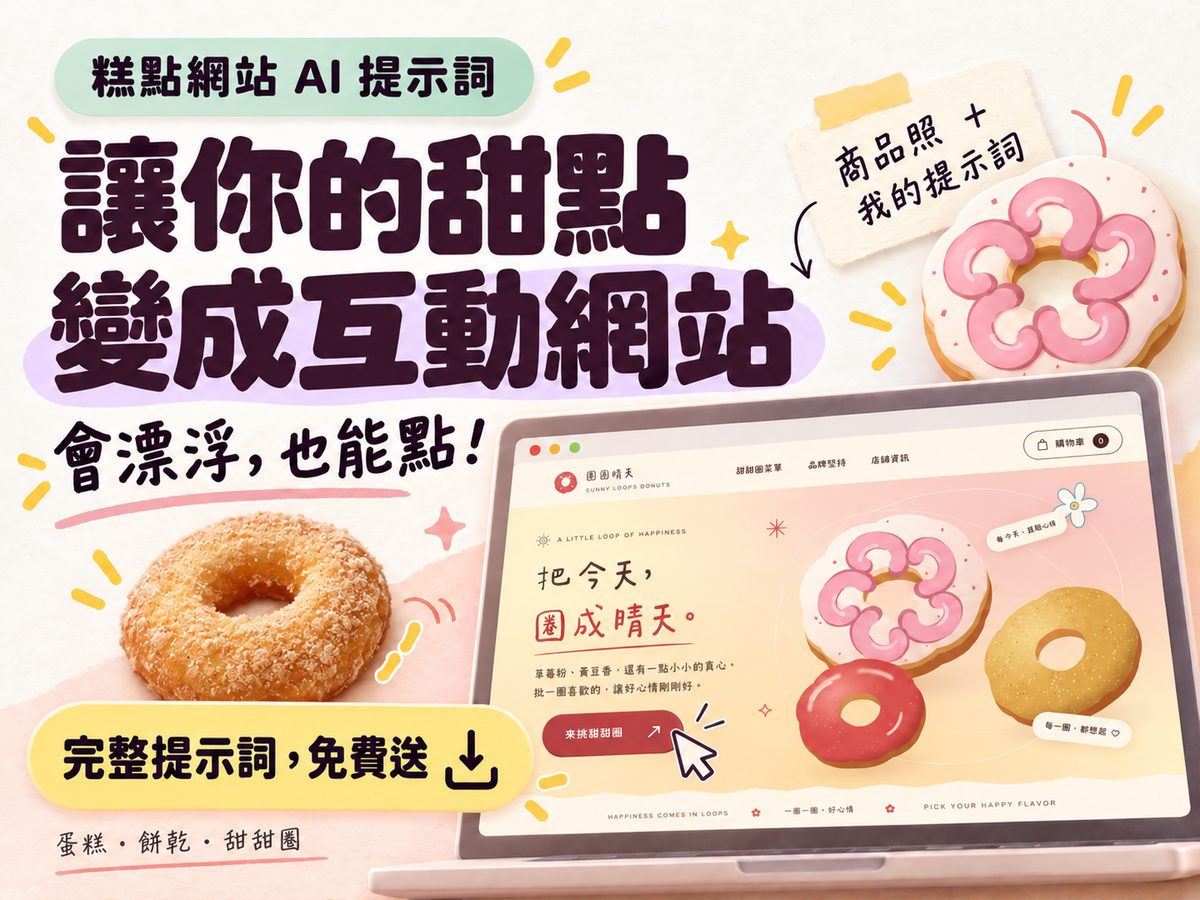
Ask an AI to build a dessert shop website and eight times out of ten you get the same shop. Pink background, rounded cards, your products redrawn as illustrations, buttons that do nothing, and a "mini-game" that is one button that wobbles when clicked. That's not because the AI can't do it. It's because you never told it what must not change and what must actually work. The condensed prompt below locks the four places that break most often; the full version I put together has nine sections, linked at the end.
TL;DR
① Say "the photos are the hero" first: hero, product cards, and product dialog all use the photos you uploaded, never illustrations or AI-generated fakes.
② The design grows out of the photos: analyze palette, silhouette, and texture first, then decide backgrounds, buttons, and motion. No default pink.
③ What should work must actually work: the cart adds, removes, merges, and totals; the game has start, input, score, end, and replay.
④ Write the language switch and the missing-glyph check into the prompt, or Chinese headings show up as boxes.
⑤ When the result is off, fix one thing at a time in the same conversation. Don't re-paste the whole brief.
Why every result looks like the same shop
Try it once and you'll see the failures all look alike. It comes down to three things:
- You never said the photos are the hero. Handling images is effort for an AI, so if you don't insist, it takes the cheap path: redraws your cake as an SVG illustration or grabs a generic dessert image. You wanted to show a client your products, and not one photo on the site is yours.
- You never said the design comes from the photos. "A cute dessert website" has a default answer in the AI's head: pink, rainbows, flowers, rounded type. Chocolate cake and fruit tart get the same treatment because it never looked at the colors in your photos.
- You never said "it has to actually work." Write "with a cart and a mini-game" and you get a cart icon and a button that wobbles. To the AI, that counts as "has." Spell it out: add, decrease, remove, merge identical items, subtotal, empty state; the game needs start, input, score, end, replay.
The four things this prompt locks
The condensed version only talks about four things, and each one switches off a shortcut:
- Photos are the hero: cropping, background removal, and shadows are fine, but the product's appearance, proportions, and colors may not change, and no illustrations in its place.
- The design grows out of the photos: analyze before designing, extract the main colors from the photos, echo the product's silhouette and texture in the decoration.
- What should work must actually work: header, product dialog, cart, mini-game, each with a minimum bar for "working."
- Delivery has to be verified: one HTML file, self-checked for photos, missing glyphs, language, mobile, cart, and game, preview first, explanation after.
The condensed prompt (ready to use)
Copy the whole block and send it with 3 to 10 product photos to an AI that can read images and write a website (Claude, ChatGPT, and Gemini all work; so do site builders like Lovable and Bolt). Use photos of the same product line in similar lighting.
Paste this and the most visible difference is that the site shows your cake, the colors come from your cake, and pressing the cart button really adds one item. Get those three right and everything else is fine-tuning.
When the result is off
The first version won't be perfect, and that's normal. Fix one thing at a time in the same conversation, name the place and the symptom, and don't say "make it better." The three most common:
The products still got replaced by illustrations
Point at it directly: "The products in the hero and product cards are not the photos I uploaded. Switch back to my actual photos; cropping and background removal are fine, but appearance, proportions, and colors must match the originals. When done, tell me which photo is used in which section." That last sentence matters. It forces a photo-by-photo check.
Everything turned pink
Make it show its work before changing anything: "Re-extract the main colors from my photos, list the 3 to 5 hex codes you extracted and which part of which photo each one comes from, then rebuild the backgrounds, cards, and buttons from that palette." Once it has to list hex codes, it can't fall back on pink from memory.
The mini-game is just an animation
Give it the definition of a game: "The current mini-game only plays an animation, which doesn't count. Rebuild it as something that can actually be played: instructions, start, player input, score, end condition, replay, working with both touch and keyboard."
The full version has five more fixes: missing-glyph boxes, an incomplete language switch, horizontal overflow on mobile, too many effects, and wrong cart math.
Want the full version
The condensed prompt above is enough for a solid prototype. The full version I put together has nine sections and adds: how photos should be handled so angles don't get swapped, design directions for six kinds of pastry (cake layers, cookie embossing, croissant flakes), rules against inventing sizes and flavors for product options, the complete motion list, accessibility and performance requirements, plus preparation before you start, 8 symptom-matched fix prompts, and a pre-delivery checklist. In English and Traditional Chinese.
Get the full version free: Build Your Own Dessert Website, One Prompt, Done in Three Minutes →
Sign in and you get the link. Prompts copy in one click, English and Traditional Chinese included, yours to keep.
If you want to understand why AI-made things look AI-made at a glance, read the Style DNA reverse-engineering post next. Same logic: no adjectives, only rules and "don'ts."
FAQ
Q1: Which AI tools can I use?
Anything that accepts image uploads and outputs a runnable web page. Claude (Artifacts, Claude Design), ChatGPT, and Gemini qualify, and so do site builders like Lovable, Bolt, and v0. Free plans usually cap the number of images or the output length, and this prompt plus photos uses a fair amount of quota.
Q2: Do I really need product photos?
Yes. The whole prompt is built around "photos are the hero, the design comes from the photos." Without them the AI can only produce a generic dessert site, which is exactly the one you don't want. Phone photos are fine as long as the lighting is even and the background is clean.
Q3: Can I put the generated site live as is?
It's a prototype, not a production site. Great for a brand pitch, a new-product concept page, or confirming a style before a client project. The cart is an interactive demo with no real payment, orders, or inventory; running a shop means wiring up payments and a back office, and hosting and a domain are separate costs.
Q4: Does it work for products that aren't desserts?
Yes, with two edits. Replace the examples in the "design grows out of the photos" section with your category, and replace the mini-game examples. The rest is generic; drinks, lunch boxes, and similar products follow the same logic.
If you want to turn the prototype into a shop that actually takes orders, or need someone to wire up payments, order notifications, and a back office, get in touch.