Stop Telling AI to "Copy This Image": Reverse-Engineer Your Style DNA So AI Actually Gets Your Taste
Most people only ever tell AI to make something "premium, minimal, high-quality" — the equivalent of telling a designer "make it look good" and expecting them to read your mind. This post breaks down a different method: have AI reverse-engineer 3 images you love into concrete rules, compile them into a Style DNA, then apply that DNA to a brand-new topic — with the full 6-dimension analysis framework and anti-AI-look generation principles.
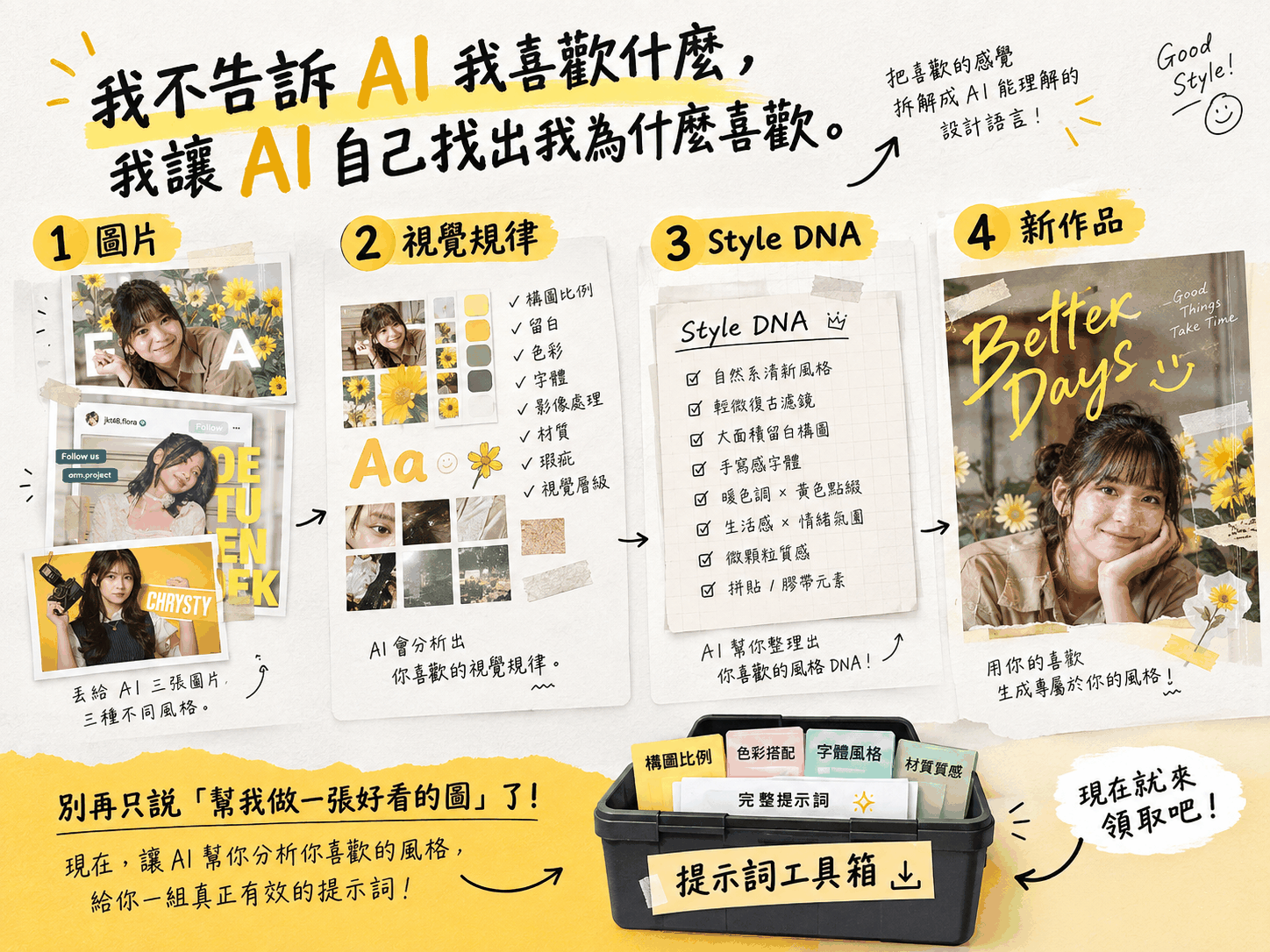
TL;DR: Most people fail at AI image generation not because AI can't design, but because they only give it abstract adjectives like "premium, minimal, high-quality." That's the equivalent of telling a designer "make it look good" and expecting them to read your mind. The actual working method flips this around: I don't tell AI what I like — I let AI figure out why I like it. Break the process into four stages — Images → Visual Patterns → Style DNA → New Work — and AI can finally reproduce your taste consistently, instead of guessing every time.
TL;DR:
① Stop telling AI to "copy this image" or "make it more premium" — these are abstract words AI can't actually execute.
② Have AI compare 3 images you love and reverse-engineer the shared patterns across 6 dimensions: composition, typography, color, image treatment, texture/imperfection, and mood.
③ Use a "Shared Pattern Matrix" to separate your core style from a single image's accidental details, so AI doesn't learn the wrong thing.
④ Apply the resulting Style DNA to a brand-new topic, with built-in "anti-AI-look" rules so the output doesn't read as generic AI art at a glance.
⑤ The complete 2-stage prompt is packaged as a free kit — link at the end of this post.
The Real Problem: You Keep Asking AI for "Good-Looking" Without Saying What That Means
Have you ever prompted AI like this?
"Make me something premium, minimal, and high-quality."
It sounds specific, but to an AI it's basically meaningless. "Premium," "high-quality," and "minimal" are adjectives describing an outcome, not executable design actions. It's like telling a designer "I want it to look good" and expecting them to psychically guess the picture in your head — what you usually get back is whatever "looks good" means to them, which is rarely what you had in mind.
AI image generation runs on the same logic. The more abstract your instruction, the more the model falls back to the most generic version in its training data — which is exactly why so much AI-generated imagery, regardless of subject, carries that unmistakable "AI look": unnaturally perfect symmetry, suspiciously clean lighting, plastic-smooth skin, every element rendered with identical sharpness. These are the generic answers that abstract instructions force out of the model — not "your" taste.
The problem to actually solve isn't "AI can't design." It's: can you break "good-looking" down into concrete rules that AI can actually understand?
A Different Method: Analyze First, Then Generate
Instead of telling AI to "copy these 3 images," a far more effective method splits the whole process into 4 stages:
- Images: Give AI 3 reference images you genuinely love — ideally from different creators or brands.
- Visual Patterns: Instead of having AI describe "what each image looks like," have it work backward to find what these images' design methods have in common.
- Style DNA: Compile the shared patterns into a visual design specification you can apply to any topic.
- New Work: Apply that specification to a completely new topic, generating an image with entirely different content but a consistent visual language.
What makes this method work is steps 2 and 3: replacing imitation with reverse-engineering. AI isn't copying the image itself — it's copying the method behind how that image was made. That's why the visual language stays consistent even when the topic changes completely — say, from a portrait poster to promoting an AI tool.
6 Analysis Dimensions: Translating "Good-Looking" Into a Language AI Understands
To get AI to produce a useful visual analysis, you can't just say "analyze the style." You need to name the specific dimensions. Here are the 6 most important angles for reverse-engineering a visual style:
① Composition
Which region of the frame does the subject occupy? How much negative space, and where? Centered or offset? What's the reading order?
❌ Don't say "the composition feels comfortable" — ✅ say "subject shifted about 35% right, 60% negative space reserved on the left for the headline."
② Typography
Font weight, size contrast, line/letter spacing, alignment, how text overlaps the image. If you can't identify the exact typeface, describe its "visual characteristics" instead (e.g. "handwritten feel, uneven stroke weight") — don't guess a specific font name.
③ Color
Overall color temperature, primary/secondary/accent colors, brightness and saturation, whether one high-saturation color is deliberately kept as the focal point. Provide approximate HEX codes where you can reasonably infer them — don't force a guess just to supply one.
④ Image Treatment
Light direction and hardness, exposure and contrast, grain, depth of field, lens perspective, whether it carries a film or scanner feel. The goal here is finding the clues that make an image NOT look AI-generated.
⑤ Texture & Imperfection
Uneven light and shadow from real photography, slight softness, imperfect symmetry, print or scan marks — these "imperfections" are exactly what makes an image read as real rather than AI-generated, and most people overlook them entirely when analyzing style.
⑥ Mood
This one is the easiest to reduce to empty words, so force yourself to answer a sharper question instead: "If I had to hand this feeling to another designer to recreate, what exactly should they do?"
❌ "It feels premium and high-quality."
✅ "Lower overall saturation, keep one high-saturation color as the focal point; use generous negative space; keep the subject off-center; use a high-contrast bold weight for text; preserve natural shadows from the photography."
The Shared Pattern Matrix: Why You Must Compare 3 Images, Not Just 1
Analyzing only 1 image carries a big risk: you'll mistake "something this particular image happens to have" for "your style." A reference image with a yellow label doesn't necessarily mean you like yellow — it might just be an accident of that one image.
The fix is comparing 3 images against each other, tagging every design trait as:
- [CORE] — present in all 3 images. This is the rule genuinely worth keeping.
- [LIKELY] — present in 2 of 3. Possibly important, but worth watching.
- [INCIDENTAL] — appears in only 1 image. Should not be copied directly.
- [CONFLICT] — the 3 images pull in different directions. List it honestly instead of forcing false agreement.
Once you've done this, what you have is no longer "the average of 3 images" — it's a set of rules you genuinely, repeatedly prefer. That's the Style DNA that's actually reusable across any topic.
Keeping the Result From Reading as "Obviously AI": Anti-AI-Look Generation Principles
Even a perfectly reverse-engineered Style DNA can still produce results that give themselves away, if your final generation prompt doesn't deliberately avoid the "AI look." Here are the typical AI tells to actively steer away from:
- Overly perfect symmetry, everything unnaturally spotless
- Unnaturally perfect lighting, excessive sharpness, over-HDR
- Plastic-looking materials, overly smooth skin
- Every element rendered with identical clarity, no clear visual focal point
The fix is prioritizing "natural imperfections that would realistically appear in real photography or design work" — uneven real shadows, faint grain, cropping that isn't perfectly aligned. But be careful with the dose: the goal isn't to make the image look "deliberately aged" — it's to make it look like something a real photographer, graphic designer, or art director actually made. Pile on too many deliberate flaws and you just create a different, equally recognizable formula.
How to Actually Do This: A 3-Step Quick Start
Step 1️⃣: Gather 3 reference images you genuinely love
Pick images of the same type but from different sources (e.g. all portrait posters, but from different designers or brands) — that's how you find patterns that genuinely repeat, instead of one image's accident.
Step 2️⃣: Have AI reverse-engineer them into a Style DNA
Combine the 6-dimension analysis requirements above with the Shared Pattern Matrix logic into a full prompt, paste it into an AI that can read images (ChatGPT, Claude, etc.), and upload your 3 reference images. AI returns a "Style DNA|AI-Executable Version" specification.
Step 3️⃣: Apply the Style DNA to a brand-new topic
Paste the specification at the top of the second-stage prompt, then fill in your new topic, functional requirements, and use case. AI makes 3 concrete visual decisions first, then produces a complete English image-generation prompt — with the anti-AI-look requirements already built in, so you don't have to think through them one by one.
I've already packaged this entire 2-stage prompt — the full 6-dimension analysis instructions, the Shared Pattern Matrix format, and the anti-AI-look checklist — into a ready-to-copy version, so you don't have to piece it together yourself. Link at the end of this post.
FAQ
Q: Do I really need 3 images? Can I just use 1?
You can use 1, but the risk is that AI will easily mistake something that image happens to have for your actual style, which then goes sideways when applied to a new topic. The whole point of using 3 is cross-checking to find what genuinely repeats — I'd strongly recommend at least 3.
Q: Does this method only work for AI image generation?
No. The core idea — reverse-engineer executable rules first, then apply them to new content — works just as well for copywriting tone, Instagram templates, or slide design. Any situation where you want AI to "learn your style" but can't quite articulate what that style is can use the same logic.
Q: Do the analysis AI and the image-generation AI have to be the same one?
No. A common setup is using ChatGPT or Claude for the visual analysis (since it needs to read images and reason over long text), then taking the resulting "Style DNA|AI-Executable Version" and pasting it into Midjourney, GPT Image, or another generation tool to run the second-stage prompt.
Want the complete 2-stage prompt without piecing it together yourself? I've packaged the Visual Reverse-Engineering Prompt and the AI Image-Generation Prompt into a free Style DNA Visual Reverse-Engineering Prompt Kit — enter your email and get the link, with one-click copyable prompts. More tested prompts and workflows live in the Digital Toolbox. Want to talk through applying this AI visual workflow to your own brand? Feel free to reach out.