AI Workflows Are Grown, Not Spoon-Fed: Vibe Coding Isn't That Vibey, So Stop Waiting for a Smarter Model
Even the best coding model gets you about 70–80% of the way in one go; the last mile takes your own knowledge. A mature AI development flow starts by interviewing you about requirements, not by writing code, and that kind of workflow can't be drawn up in one shot. You grow it loop by loop, starting with the smallest step. Includes 4 diagrams and a glossary.
You can't get a good AI workflow by waiting for a smarter model or copying someone else's setup. You grow it yourself, loop by loop, starting from the smallest step. Even today's best coding model gets you only about 70–80% of the way in one go, and the last mile takes your own knowledge. These are my notes, in my own words, after watching the mindset unit of an AI coding course by Waterball Software Academy (水球軟體學院).
TL;DR:
① Vibe coding isn't that vibey: hand AI a complete plan and it still delivers about 70–80%. Requirements, tests, performance and security take knowledge.
② Two sentences make you a bad PM: a mature AI flow starts by asking you questions (a requirements interview), not by writing code.
③ The mature flow: interview → spec → executable tests → code, with an automatic constraint layer (a harness) underneath.
④ Don't wait to be spoon-fed: models don't know your company or habits. Customization is on you.
⑤ Iterate from the smallest step: do it by hand → spot repeats and pain → turn that piece into a prompt or Skill → reuse it, then find the next pain.
1. Vibe coding isn't that vibey
"Vibe coding" means chatting with AI and letting the code appear. Demos make it look effortless, but anyone who has tried knows: even with the strongest coding model and a thorough development plan, what comes back feels about 70–80% right.
The remaining 20–30% is the hard part: are the requirements clear, are edge cases covered, will it slow things down, is there a security hole? That part depends on your knowledge, not the model.
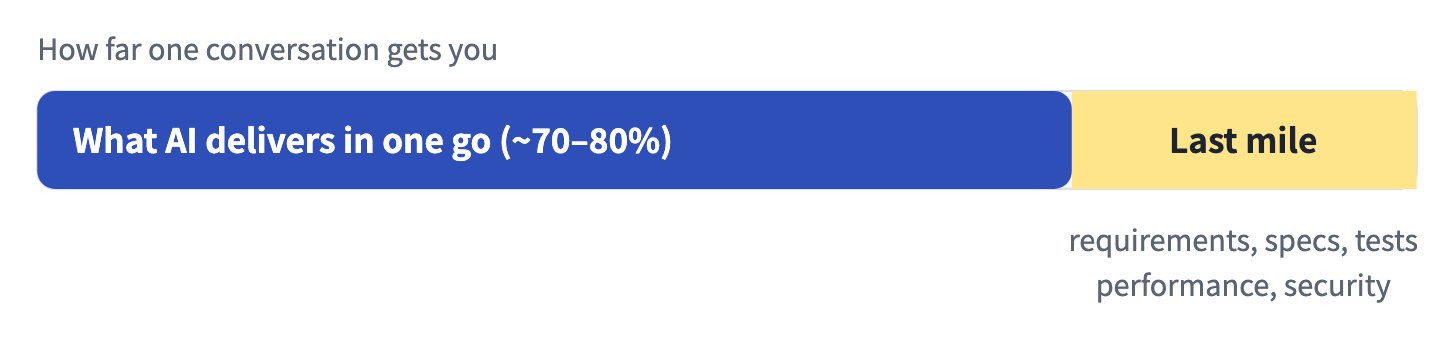
Put simply, the stronger your software engineering, the more you get to vibe. The more mature the process, the more you move from doing the work to just stating what you need.
2. If you only say two sentences, you're a bad PM
Imagine telling AI: "Build me an online course site with payments." That's it. Two sentences.
Hand that to a human engineer and they'd roll their eyes. Only a boss gets a whole team moving with two sentences, because someone below asks the follow-up questions. AI is no different: the most mature automated flow starts by asking you questions, not by writing code.
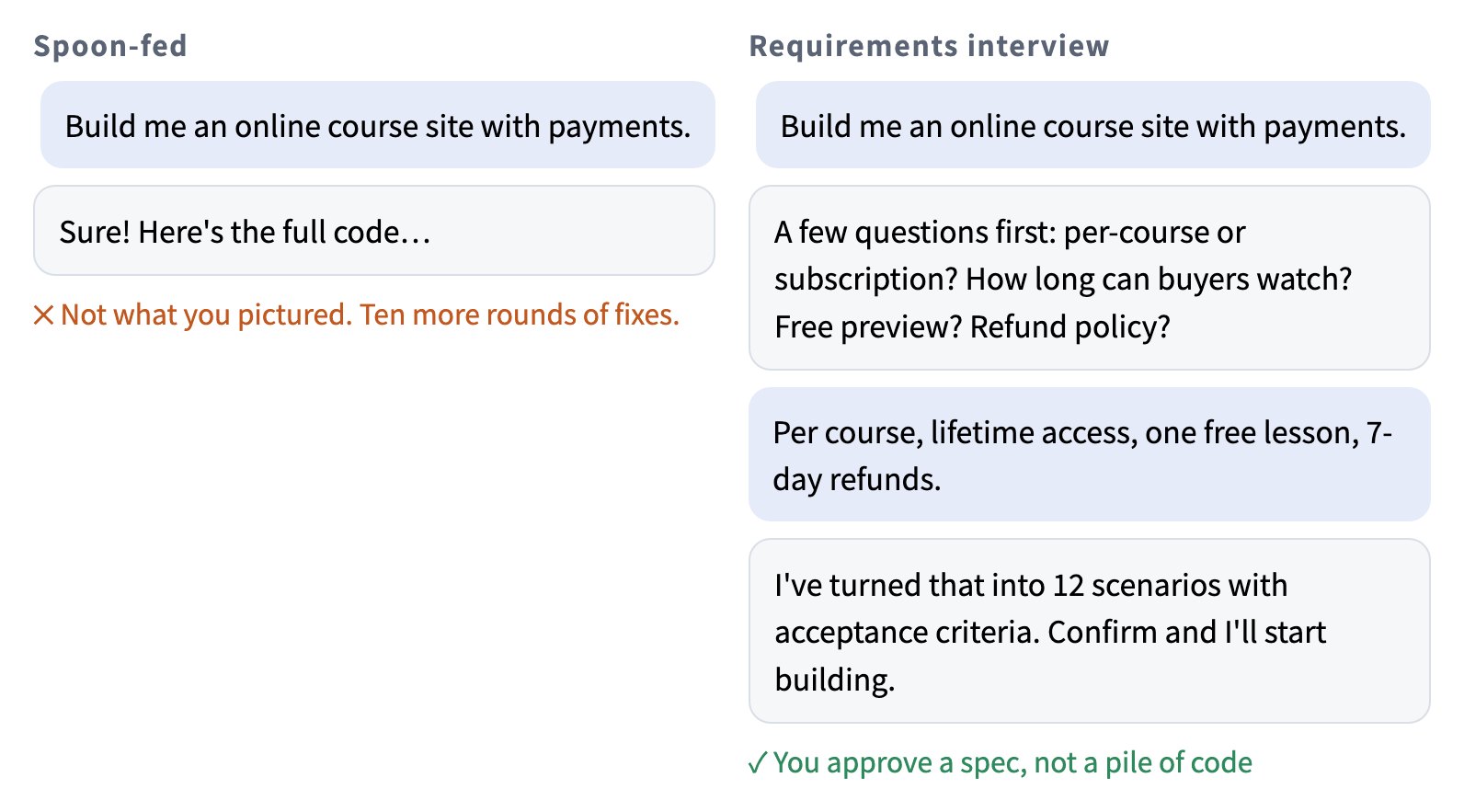
After the interview, AI comes back with concrete examples to confirm, like "If an unpaid user clicks lesson two, what should they see?" You approve them one by one, then it builds, then it runs the tests, and only when everything passes is it done. That's when you can actually walk away.
3. What does a mature AI development flow look like?
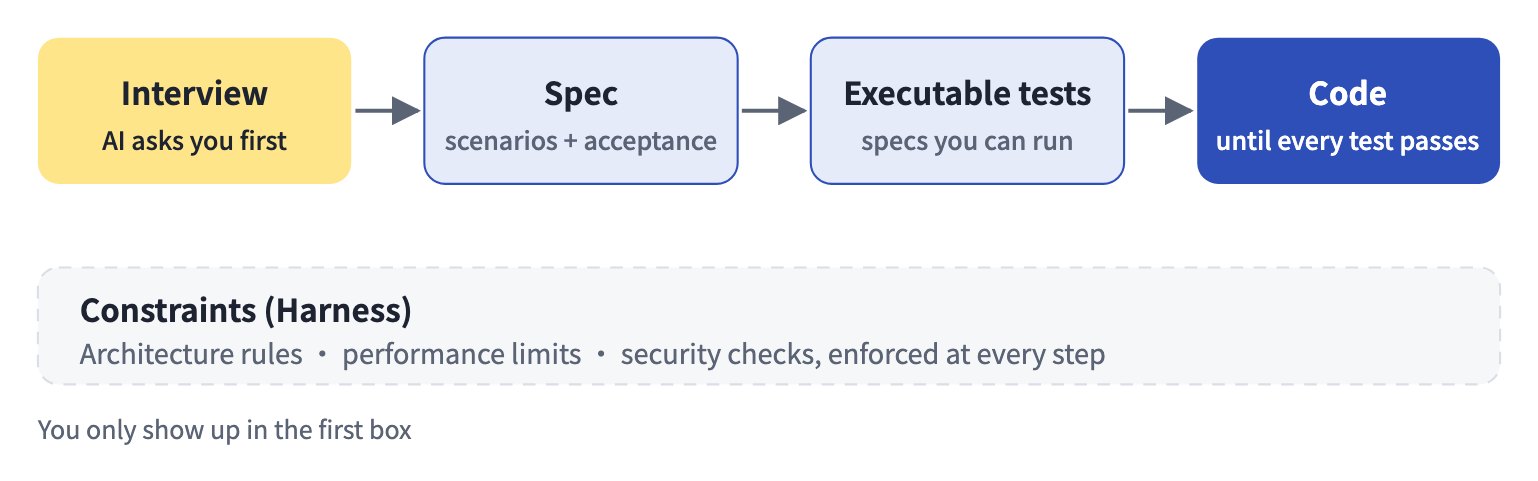
This route is decades of software engineering practice: write tests before code (TDD), describe specs as user behavior (BDD). It's a lot of steps, but here's the good news: every one of them can be written as a Skill and run by AI.
Flip it around: if you don't know this process, AI or not, you end up as the laborer again, patching line by line. No knowledge, no vibe.
4. Don't wait for the big AI companies to feed you
Plenty of people think: just wait for the next model, and it'll handle everything.
But models aren't built for you. They don't know that your PM writes half-finished requirements, that your client has strange process rules, or which parts of your system are off-limits. All of that needs customizing, and only you can do it.
When the models do get stronger, the person who benefits won't be the one who waited. It'll be the colleague who kept improving their workflow every day.
5. Start iterating from the smallest step
Many people's first instinct is to screenshot a complete workflow diagram and tell AI "build me this whole thing." It usually goes badly: the diagram has no details, you don't fully understand it yet, and AI has to guess. A better approach looks a lot like refactoring code:
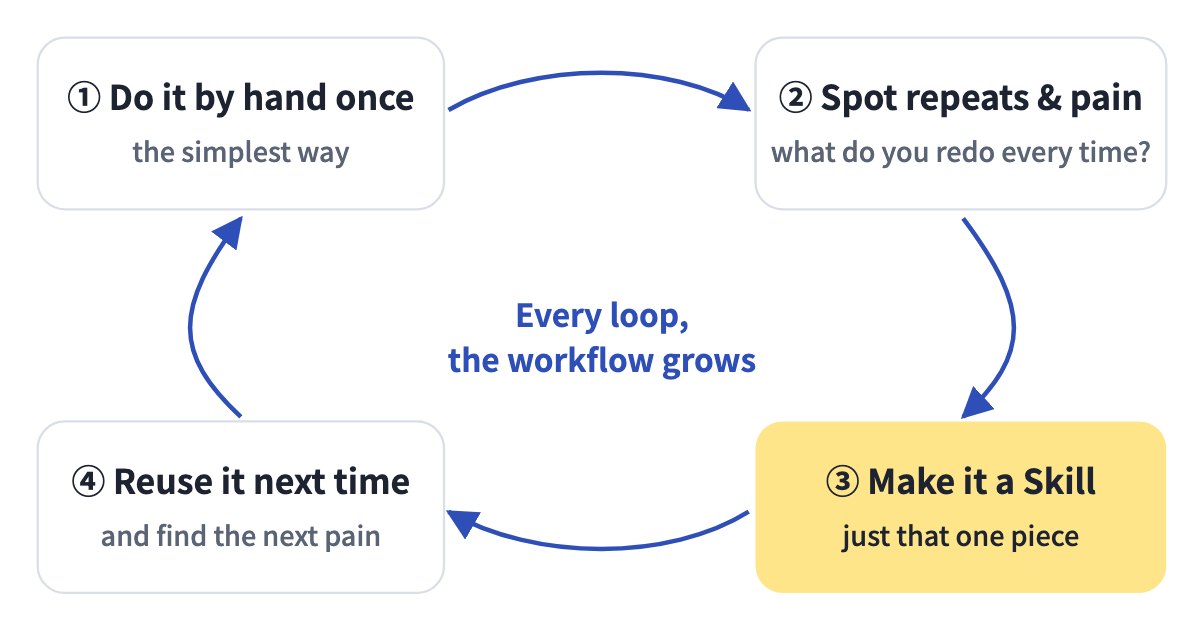
- Do it the simplest way once. Ugly is fine.
- After a few rounds, notice what keeps repeating and where you get stuck.
- Pull out just that piece as a prompt or Skill, like extracting repeated code into a function.
- Reuse it next time. You'll find a new pain point along the way, so go back to step 2.
I went through exactly this last week. I wanted Claude to analyze my Instagram numbers. At first it could only pull view counts. Then I realized it couldn't see the videos, so we added automatic downloads, frame grabs and transcripts. Some videos had no file from Meta, so we added a way to watch them in the browser. Finally the numbers didn't match my dashboard because Facebook views were missing, so we connected those too. Every step came from using it and finding what was missing. None of it was planned up front.
6. Why you can't just plug in open-source Skills
There are lots of shared Skills and workflows out there, and you can install them. But you'll soon notice they don't quite fit how you work, because someone else iterated them, not you.
A better order: write a few small Skills yourself first so you understand each step, then go back to other people's work. Now you can judge what to change and how. And don't expect AI to write every prompt and Skill for you in one go. You won't understand the result or be able to fix it; that's just pretending to work hard.
7. What you iterate is what's yours
Ideas are everywhere, but a workflow you shaped loop by loop is value nobody can take from you. Everyone can install open-source tools; few can build their own, and those people will be the most in demand.
So stop waiting for the next big model. Pick one task you repeat every week and take the smallest first step today.
Glossary
- Vibe coding: asking AI to write code by chatting and going with the flow.
- User story: a need written as "someone wants to do something, so that…".
- Acceptance criteria: a concrete list of what "done" means.
- TDD (test-driven development): write the tests that define "correct" first, then write code until they pass.
- BDD (behavior-driven development): write specs as user scenarios that non-technical people can read.
- Given-When-Then: the common BDD sentence pattern: given a situation, when the user does something, then this should happen.
- Harness: automated constraints and checks that act as guardrails for architecture, performance and security.
- Skill: a written, repeatable procedure AI follows whenever the same kind of task comes up.
FAQ
Q1: What is vibe coding? Do I really not need to know how to code?
Vibe coding is asking AI to write code through conversation. For small tools you can get away without much knowledge, but anything you ship and maintain needs software basics like requirements, specs and tests, or the last mile won't get done.
Q2: How accurate is AI-written code?
There's no official number. With a complete development plan, roughly 70–80% feels usable as is; tests and human judgment cover the rest.
Q3: What's a requirements interview, and how do I get AI to ask me questions first?
It means clarifying details before building. The simplest way: add "Before you start, ask me the 10 questions you need answered, and wait for my answers" after your request.
Q4: Where do I start writing AI Skills?
Pick a task you repeat weekly, do it by hand a few times, and write the steps that never change as a fixed set of instructions. That's your first Skill. Improve it each time you use it.
Q5: Can I just use open-source Skills other people share?
They're good references and starting points, but you'll usually need to adapt them. Writing a few small Skills yourself first makes it much easier to see what to change.
Further reading
- Claude in Chrome guide: let Claude operate your browser
- Four personal AI agents compared (2026)
- Zeona Toolbox: free prompt packs
※ The ideas here come from the mindset unit of Waterball Software Academy (水球軟體學院)'s AI coding course, rewritten in my own words with my own hands-on experience added. If you want to go deeper, I recommend their full lessons at Waterball Software Academy (水球軟體學院). I found them really good!