Can't Decide? Let an "AI Jury" Help: How to Install and Use Claude Court
Ask AI whether something is a good idea and it almost always says yes. Claude Court has one AI attack your idea, one defend it, and 12 AI jurors with different backgrounds vote, then tells you what to fix first so the decision can hold up. How it works, the official sample verdict, install steps and what to know first.
I'm an indecisive person. Whatever the decision, there are several voices in my head arguing. Asking AI didn't help, because it almost always says "great idea". Then I found a free tool called "Claude Court": one AI picks your idea apart, another defends it, 12 AI jurors with different backgrounds vote, and at the end it tells you which things to fix first so the decision can hold up. This is my quick guide: how it works, how to install it, and how I use it against decision paralysis.
Why asking AI "is this a good idea?" doesn't help
If you struggle to make decisions, you've probably tried this: hand your dilemma to an AI and hope for an answer. But AI tends to go along with you. If you want to do it, it says yes; if you're worried, it agrees your worry makes sense. The voices in your head keep arguing, now with one more voice nodding along.
That problem is exactly why the author of Claude Court built it. In his own words: ask Claude whether something is a good idea and it usually says yes; /court puts the same idea on trial instead.
How the AI jury works: one trial, four roles
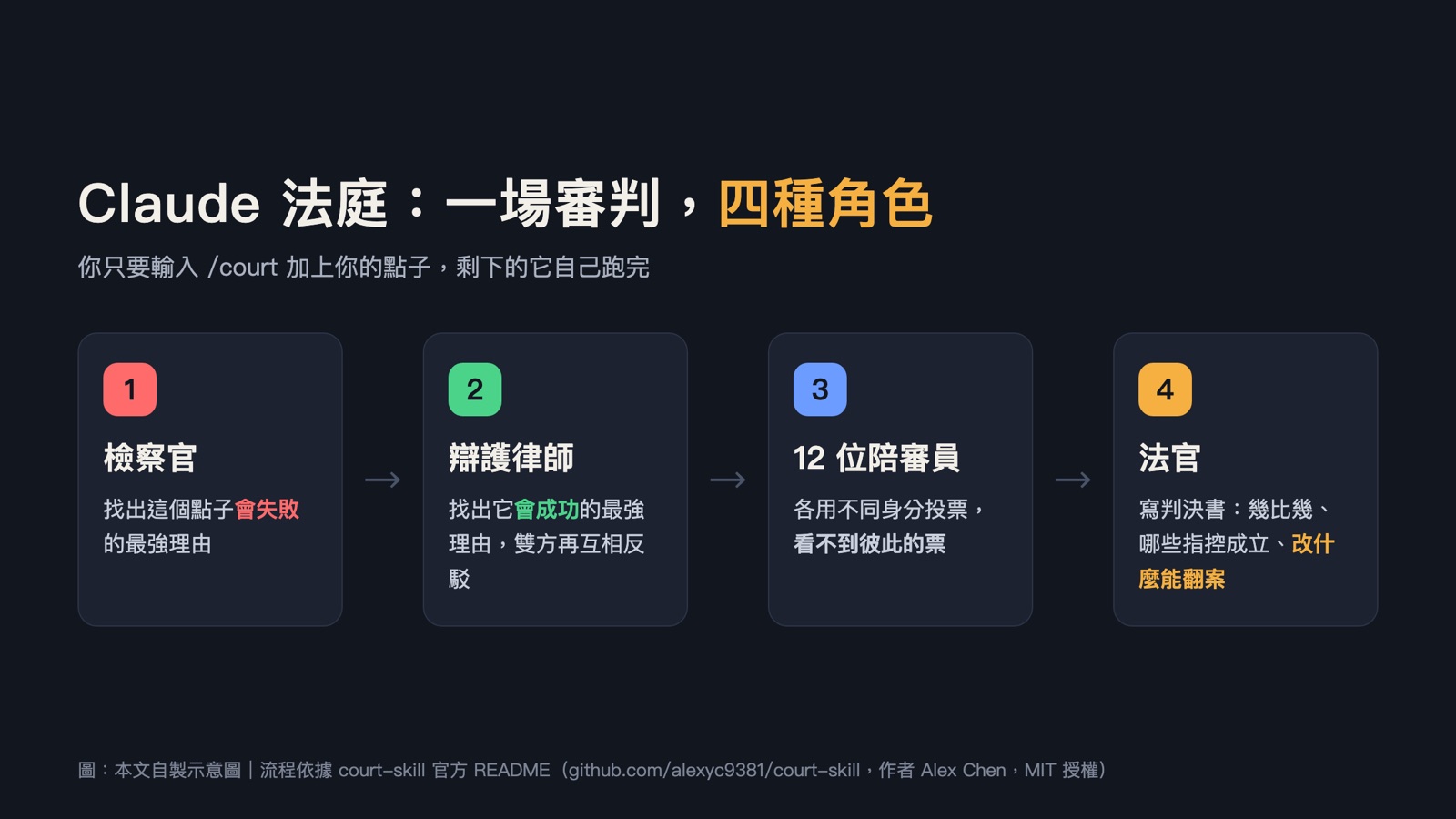
What it really does is bring the arguing voices in your head into a courtroom and let them argue properly, once:
- Prosecutor AI: speaks for the voice saying "don't do it", making the strongest case for why the decision will fail.
- Defense AI: speaks for the voice saying "go for it", making the strongest case for why it can work.
- Both sides rebut each other's arguments.
- 12 juror AIs: each reads both sides and votes, and they can't see each other's votes, so nobody just follows the crowd.
- Judge AI: writes the verdict: the vote count, which concerns are real and which are overblown, and the "flip conditions": what you'd need to change for more jurors to vote in favor.
The verdict is either "guilty" or "not guilty". "Guilty" means "as you've described it, this decision shouldn't go ahead as is". It has nothing to do with legal guilt.
12 jurors who show you your blind spots
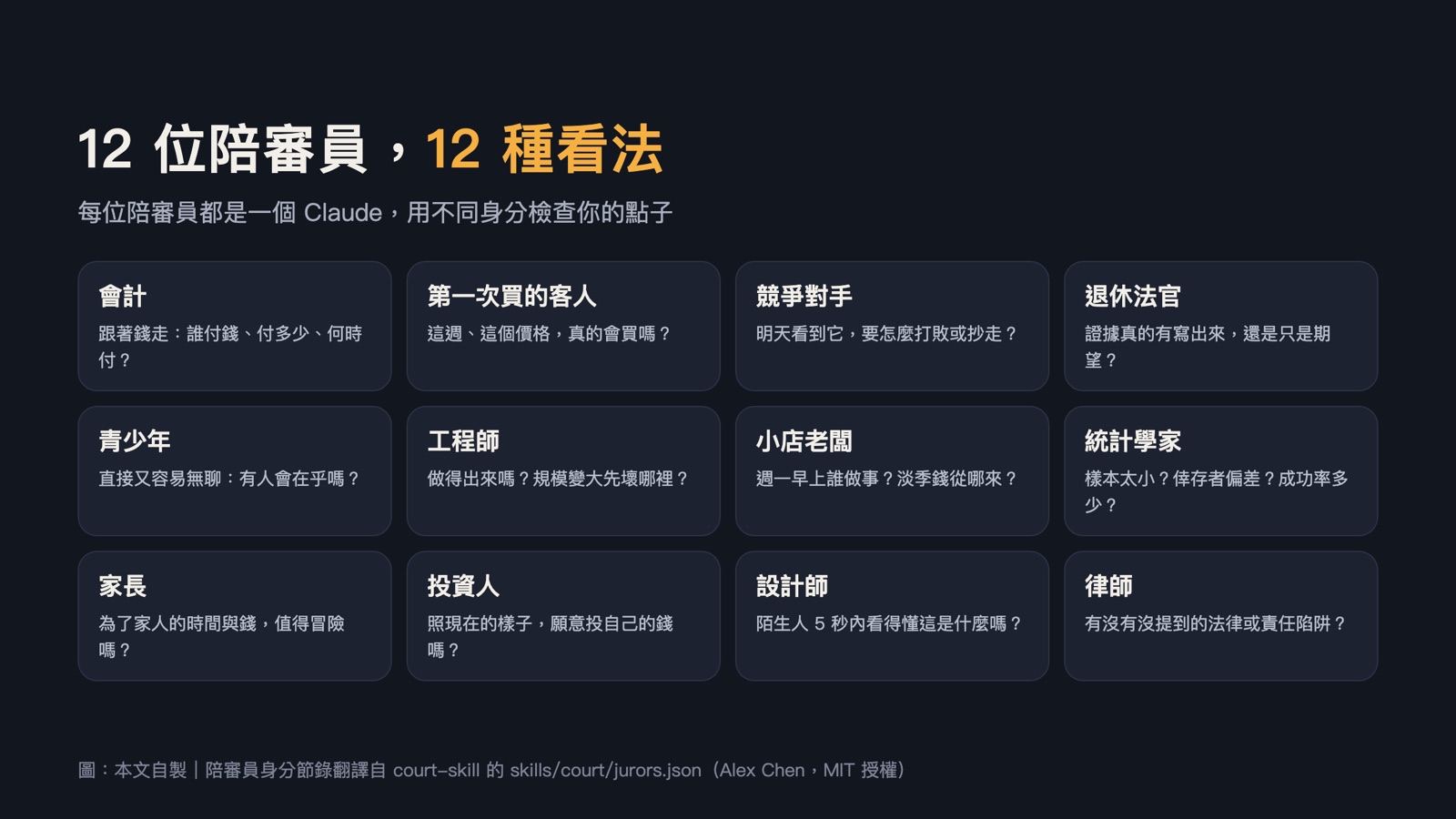
skills/court/jurors.json.For me this is the most useful step. When we're stuck, we usually keep circling the same one or two angles. Each of these 12 jurors has its own checklist: the accountant asks where the money comes from, the statistician asks whether you're drawing conclusions from too small a sample, the parent asks whether it's worth the risk, the lawyer asks about legal issues you haven't thought of… A lot of things I'd never considered were pointed out by one of them.
What does a verdict look like?

examples/candles/VERDICT.md (3-juror version).This is the sample the author ships with the tool. The case: "quit my nursing job to sell handmade candles on Etsy full time", with US$8,000 in savings, 40 candles sold in 3 months (US$28 each) and rent of US$1,600 a month.
The result was "guilty", 3–0. The statistician noted it assumes sales will more than quadruple based on a single three-month total; the parent worked out monthly revenue of about US$373 against US$1,600 in rent; the lawyer flagged the fire risk of making candles at home, with no insurance and no landlord approval.
But it doesn't stop at "don't do it". It lists three things to do this week: track monthly sales and set a growth target, ask the employer about unpaid leave, and get the landlord's approval and insurance. The judge's conclusion: don't hand in your resignation yet; get these three things done, then come back with a plan.
For anyone with decision paralysis, this is the most helpful part. It doesn't just pick "do it" or "don't" for you; it breaks one big, stuck decision into a few small steps you can start this week.
How I use it against decision paralysis
- Try one option at a time: it judges one idea per trial. If you're stuck between A and B, put A and B on trial separately and compare the two verdicts' vote counts and flip conditions. (This is my own approach, not an official feature.)
- The more specific, the better: include your budget, timeline, current results and biggest worry. The jurors only see the case you give them, not your earlier conversation with the AI.
- Don't like the verdict? Revise and retry: change your plan according to the flip conditions, then hold another trial. The author recommends this in the instructions too.
For example (a made-up case for this article):
/court --quick I want to quit my job to run Instagram full time. I have 3,000 followers, NT$20,000 a month from freelance work, and savings to last 6 months.Quick guide: how to install
Want to follow along step by step, with one-click copy on every command? I put the full guide in the Zeona Toolbox, free with sign-in:
Read the free step-by-step guide →
You need Claude Code installed and signed in on your computer. The tool itself is free and open source (MIT license), with no sign-up and no separate API key.
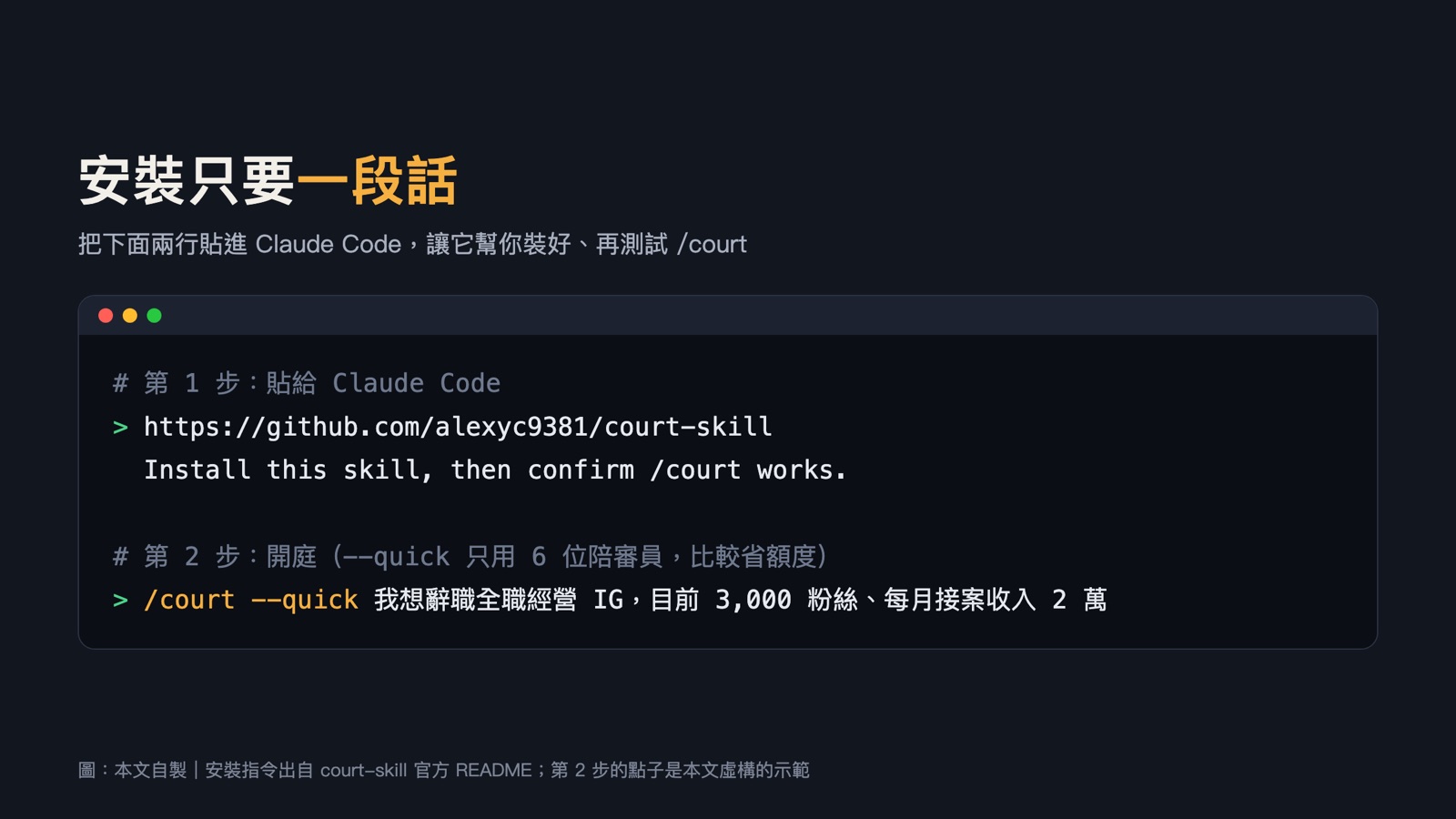
The easiest way: ask Claude to install it
Paste these two lines into Claude Code:
https://github.com/alexyc9381/court-skill
Install this skill, then confirm /court works.
Other install methods (from the official README)
Copy the folder yourself:
git clone https://github.com/alexyc9381/court-skill
cp -r court-skill/skills/court ~/.claude/skills/
Use the skills CLI:
npx skills add alexyc9381/court-skillInstall as a plugin; the command then becomes /court-skill:court:
/plugin marketplace add alexyc9381/court-skill
/plugin install court-skill@court-skill
Starting a trial
Type /court followed by your dilemma. Optional flags:
| Flag | What it does |
|---|---|
--jury N | Number of jurors, 3 to 12; default 12 |
--quick | Uses only 6 jurors, which saves usage |
--seed S | With a smaller jury, fixes which jurors attend, so retrials are comparable |
When it finishes, the verdict is saved as VERDICT.md in a .court/ folder inside whatever folder you're in.
Things to know before you use it
- The tool is free, but it uses your quota: a full trial makes 17 AI calls and
--quickmakes 11, all counted against your Claude plan. For your first try, add--quick. - Turn on accept-edits first: press Shift+Tab to switch to accept-edits mode before the trial, so it doesn't ask you every time it writes a file.
- It won't touch your files: all records go into the
.court/folder. I'd hold trials in an empty folder. - The verdict is input; the decision is still yours: the jury is AI, and the author describes the verdict as a "structured second opinion", not legal, financial or professional advice.
- This isn't an official Anthropic tool. It's made by Alex Chen (Instagram @nocodealex).
How to uninstall
Delete the ~/.claude/skills/court folder (the removal method in the official README). If you installed it as a plugin, remove it from the /plugin menu in Claude Code.
Sources
- Official court-skill README, Alex Chen, github.com/alexyc9381/court-skill (MIT license, accessed 2026-11-09)
- court-skill source code: skills/court/jurors.json, skills/court/court.py
- Official court-skill example: examples/candles/VERDICT.md, case.md
- court-skill instructions: skills/court/SKILL.md
- The author's full guide: chen.media
All images in this article are my own diagrams, based on and translated from the sources above. /court skill by Alex Chen (@nocodealex): github.com/alexyc9381/court-skill